Context Engineering in AI-Driven Software Development


Your AI coding assistant is only as good as the context you give it. Here's how to stop wasting tokens on grep and start engineering context like a pro.
Every developer who's spent time with an AI coding assistant has hit that wall. You're deep into a refactoring session with Claude Code, Cursor, GitHub Copilot, Windsurf, whatever your tool of choice, and it's humming along. Then suddenly it starts hallucinating function signatures, suggesting imports that don't exist, or confidently pointing you to code that was deleted three sprints ago.
The problem isn't the model. It's the context.
Context engineering is quickly becoming one of the most important skills for developers working with AI tools, and nowhere is it more critical than when navigating source code. In this post I'll break down what context engineering actually means here, why it matters so much for code, and how purpose-built tooling can transform your AI agent from a glorified grep machine into something that actually understands your codebase.
What Is Context Engineering?
Before we talk about code, let's ground ourselves in how LLMs work. At least enough to make the rest of this post click.
Tokens: The Currency of AI
LLMs don't read text the way you and I do. They process tokens, chunks of text that are roughly ¾ of a word on average. Every word you send, every line of code the model reads, every character of its response, it all costs tokens.
This matters because tokens aren't just a billing unit. They're a sort of finite resource that directly determines what the model can "think about" at any given moment.
The Context Window
The context window is the model's working memory, the total number of tokens it can hold at once. This includes the system prompt, your conversation history, any files or tool results, and the model's own responses. Modern models offer context windows ranging from 128K to 1M+ tokens, which sounds enormous until you start feeding them source code.
Most developers just don't realize that a bigger context window doesn't mean a better experience. As the window fills up, models are more likely to:
- Miss instructions buried in the middle of the context
- Hallucinate details that blend information from unrelated parts of the window
- Lose track of what's actually relevant versus what's simply present

Think of it like a desk. A bigger desk lets you spread out more papers, but it doesn't help you find the one you need faster. At some point, the clutter actively hurts.
Context Compaction
This is where "context compaction" comes in, the practice of summarizing or pruning older conversation history to free up space in the context window. Tools like Claude Code and Cursor will do this automatically when context gets long, condensing earlier exchanges into summaries so the model has room to keep working.
Compaction helps, but mostly as a band-aid to allow for longer-running conversations. The real question is: how do we avoid filling the context window with low-value information in the first place?
That's context engineering.
Context Engineering in Software Development
Context engineering is the discipline of deliberately controlling what information enters an LLM's context window, when it enters, and in what form. In software development, this takes two primary shapes.
1. Manual Context Management
When you're driving the session, chatting directly with an AI agent, asking questions, and providing references, you're managing context directly. Experienced developers build intuition for this:
- Starting fresh sessions (or clearing the current context) for new tasks instead of dragging in stale context from a previous conversation.
- Triggering compaction (optionally with compaction instructions) when a session gets long, or manually summarizing where things stand before continuing.
- Being selective about what code to share: pasting the relevant function rather than letting the LLM read the entire file.
This is table stakes. If you're using AI coding tools daily, you've probably already developed habits like these.
2. Context Engineering in Agents and Workflows
Things get more interesting and consequential when AI agents operate with greater autonomy. Think of agents that plan multi-step tasks, coding workflows that chain tool calls together, or CI pipelines that invoke AI for code reviews.
In these scenarios, context engineering becomes an architectural concern:
- On-demand resource loading: Rather than stuffing the context window with every possible piece of reference material upfront, well-designed agents load skills, documentation, or examples only when the current task requires them.
- Agent segmentation: Complex tasks get broken down across specialized sub-agents, each with its own focused context. A sub-agent that gathers information about your test suite doesn't need to also hold the full API schema in memory. It does its job and reports back a concise result.
- Delegation over accumulation: Instead of one agent reading 40 files to understand a dependency chain, a well-architected system delegates the lookup to a purpose-built tool that returns a structured answer. The primary agent gets the result without the overhead of the discovery process. This is exactly the design philosophy behind the Model Context Protocol (MCP), a standard that lets LLMs call external tools and receive structured results, keeping the heavy lifting outside the context window.
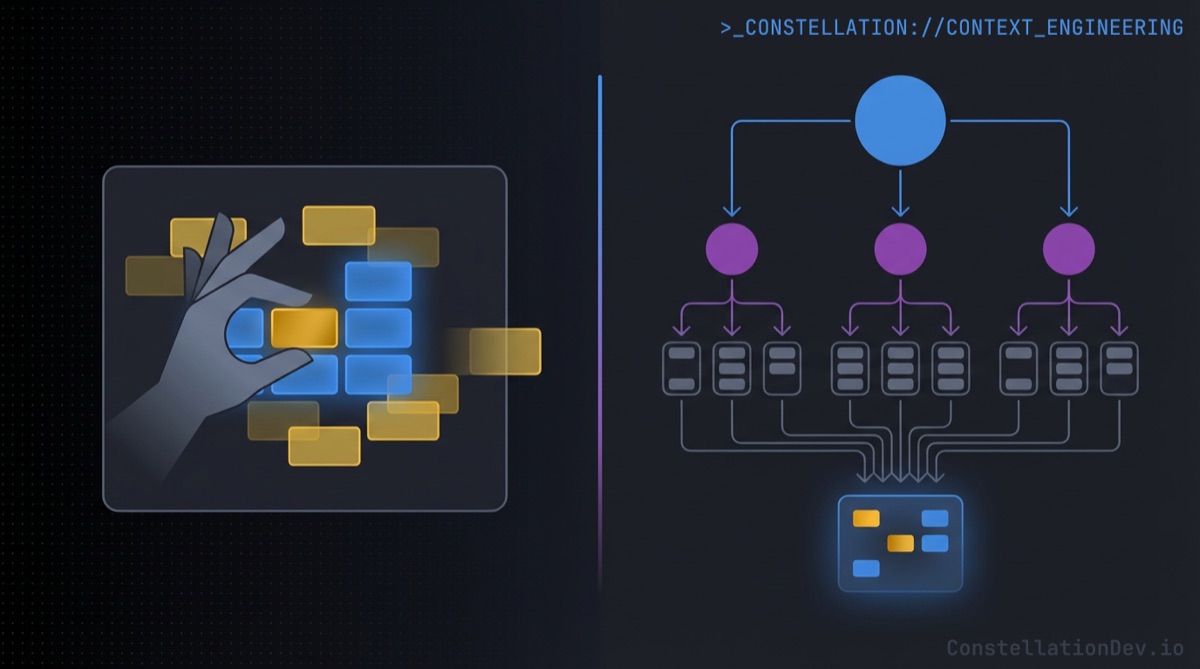
The principle is the same in both cases: every token in the context window should earn its spot.
How LLMs Traditionally Navigate Source Code
Here's where things get uncomfortable. Strip away the polished UX of your favorite AI coding tool, and look at what actually happens when an LLM tries to understand a codebase. The default toolkit is remarkably primitive:
- Search for keywords: grep, ripgrep, or file search for strings that seem relevant.
- Read files: open matching files and pull them (partially or fully) into context.
- Hope for the best: try to synthesize understanding from what amounts to a keyword-matched pile of text.
This works okay for small projects or simple questions, but it falls apart fast. Here's why:
Grep doesn't understand code
When you search for processPayment, grep happily returns the function definition, the test file, the comment that says "TODO: refactor processPayment," the changelog entry, and the string literal in an error message. It treats source code like plain text because, to grep, that's exactly what it is.
The AI agent then has to spend tokens reading each result, figuring out which ones are actually relevant, and trying to build a mental model of the code's structure from these scattered fragments. It's like trying to understand the architecture of a building by reading random pages from the blueprint. You might piece it together eventually, but you'll waste a lot of time and probably get some things wrong.
The cost compounds
Every irrelevant grep result that enters the context window is a token tax, it takes up space, adds noise, and pushes the model further from the signal it needs. Multiply this across a multi-step task where the agent needs to understand dependencies, trace call chains, and assess impact, and you're burning through context window capacity at an alarming rate.
This is the fundamental mismatch: we're asking structural questions and getting text-search answers.
Helping LLMs Actually Understand Source Code
What if, instead of treating code as text to be searched, we gave AI agents tools that understand code as code?
This is the shift from text search to code intelligence, and it changes everything about how context engineering works for coding sessions.
Searching Symbols, Not Strings
Consider the difference between searching for the string "UserService" across your codebase versus asking: "Find the class named UserService and tell me its visibility and its inheritance hierarchy."
The first approach returns every file containing that string... imports, comments, variable names, test mocks, documentation. The second returns precisely the structural information a developer (or an AI agent) needs to understand that class.

With tools like Constellation's search symbols and symbol details MCP tools, an AI agent can locate a specific function, class, or type and immediately get metadata that matters: what kind of symbol it is, its cyclomatic complexity, its access modifiers, whether it's exported, what parameters it takes. No file scanning required. No wasted tokens on irrelevant matches.
Navigating Code Like a Programmer
Here's the thing... human programmers don't work the way typical AI tooling does. When you need to understand a function's role in the system, you don't text search for its name and read every result. You right-click it and hit "Find All References." You jump to the definition. You trace the call stack.
These are purpose-built navigation tools, and they exist because decades of developer tooling evolution proved that string search isn't enough for understanding code.
So why are we asking AI agents to work without them?
Finding all dependents of a specific symbol, the equivalent of "Find All References", lets an AI agent quickly understand the significance and utilization of that symbol, and subsequently blast radius of a change. With Constellation's getDependents tool, the model gets a structured dependency graph: here are the 14 files that import this function, here are the 6 functions that call it, here's the class that extends it. No scanning. No guessing. Pure signal.
Finding dependencies of a specific symbol works in the other direction. Need to understand what a function reaches into? The getDependencies tool returns the imports, the called functions, the extended classes... a complete picture of downstream dependencies delivered as structured data rather than raw file contents.
The difference in token efficiency is dramatic. Instead of reading 20 files to discover 8 relevant relationships, the AI agent gets exactly those 8 relationships in a compact, structured response. The context window stays clean, and the model can spend its tokens on reasoning about the code instead of discovering it.
What Becomes Possible
When you change the fundamental mechanism through which an LLM navigates code (from text search to structural intelligence) some powerful capabilities emerge organically.
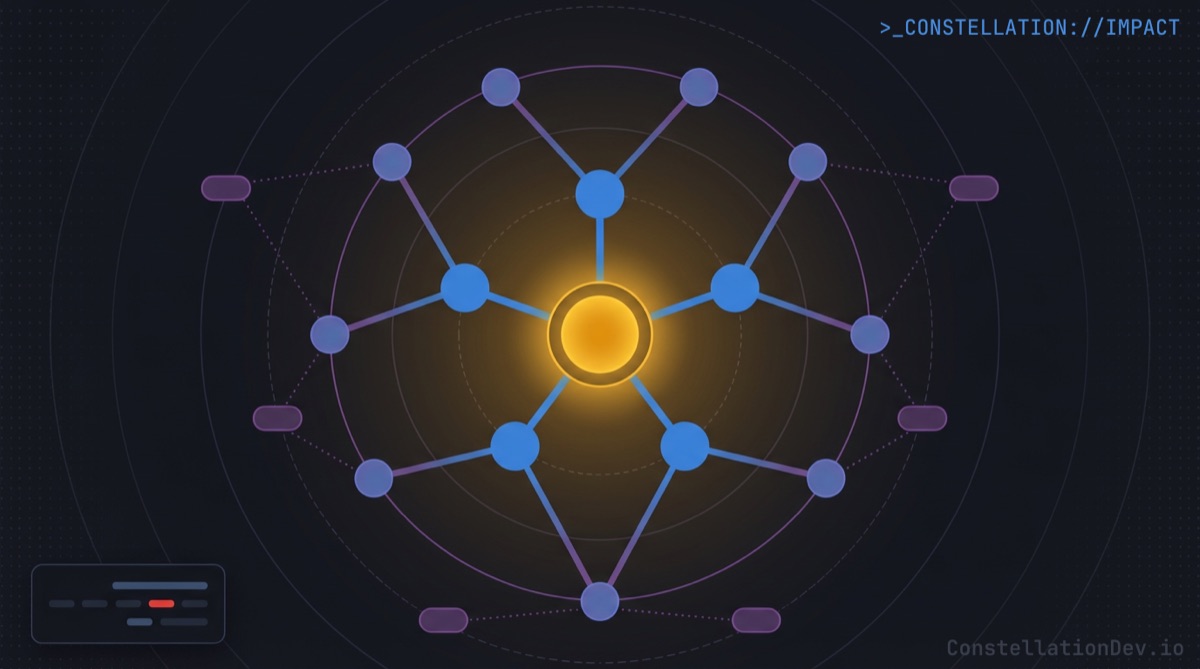
Impact analysis becomes fast and accurate. Want to know what breaks if you refactor PaymentProcessor? Instead of the model grepping for the class name, reading every match, and trying to reason about which references matter, it gets a structured impact graph: direct dependents, transitive consumers, affected test files, and a risk assessment. What could take minutes of scanning and reasoning becomes a single tool call returning exactly the right information.
Dead code detection becomes reliable. Finding unreferenced symbols is trivial when you have a dependency graph, but distinguishing genuinely dead code from entry points, event handlers, and test utilities requires structural understanding that grep simply cannot provide. An AI agent with access to code intelligence can identify orphaned symbols and explain why they appear unused, taking into account export status, framework conventions, and test coverage.
Architecture analysis goes from a multi-file scanning marathon to a rapid, structured overview. Frameworks, patterns, module boundaries, and dependency hot spots all derivable from pre-computed structural metadata without reading a single source file into context.
The Bottom Line
Context engineering is the discipline of making every token count. In coding sessions, the highest-leverage thing you can do is upgrade the tools your AI agent uses to understand code.
Grep and file search got us this far. But as AI-assisted development matures, as we ask these tools to handle larger tasks across bigger codebases with more autonomy, the text-search foundation buckles under its own weight. The context window fills with noise, the model loses the plot, and developers lose trust.
The answer isn't a bigger context window. It's better context.
At ShiftinBits we're building Constellation, the shared code intelligence layer for AI coding agents. Constellation maintains a team-wide knowledge graph of your codebase and exposes it to tools like Claude Code, Cursor, GitHub Copilot, and Windsurf via the Model Context Protocol (MCP), giving them structural understanding of your code with symbol-level search, dependency graphs, impact analysis, and more.
You wouldn't expect a human to efficiently code in a plain text editor with no other tools than CTRL+F, give your AI coding agents the same courtesy!
If you're building with AI coding tools and want to see what your agents can do with real code intelligence, check out Constellation. For a limited time, we're giving early adopters 50% off with the promo code ROOTNODE50.